![logo_White.png]](https://help.peekmed.com/hs-fs/hubfs/logo_White.png?height=40&name=logo_White.png)
Last updated on January 19 2023
Here you have some tools that allow you to manipulate the image you are working on.
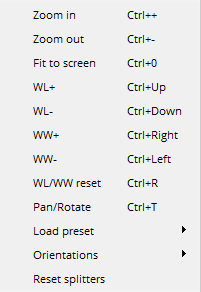 Zoom in: lets you zoom in (applies to plan view);
- Zoom out: lets you zoom out (applies to plan view);
- Fit to screen: lets you reset the starting position of the image and/or three-dimensional objects;
- WL+: increase brightness;
- WL-: decrease brightness;
- WW+: increase contrast;
- WW-: decrease contrast;
- WL/WW reset: reset the image contrast and brightness levels to the original values;
- Pan/Rotate: pan/rotate the image;
- Load preset: the planning over MRI/CT scans lets you load the preset for the three-dimensional object from the following available options:
-
- Default;
-
- CT Bones;
-
- CT Vessels;
-
- CT Skin;
-
- MRI;
- Orientations: lets you choose the orientations of a 2D/Hybrid CT/MRI’s. It’s mandatory to have at least one orientation selected:
-
- Axial;
-
- Coronal;
-
- Sagittal;
- Reset splitters: reset the sizes of the 2D and/or 3D renderers.